
Integrate Provider
Run a URnetwork provider inside your app. Each installation provides as a client of your network and earns to one Bittensor wallet that you set once.
A provider shares the device's internet connection: other URnetwork users' traffic exits through it. While it runs, your app shows four things: whether it is providing, the clients it served, the data it provided and the payout wallet, read only. Earnings totals come from your backend. Runnable examples cover twelve languages and three platforms of their own: Electron, Tauri and Android. They all implement the provider contract, which holds the exact rules; this page explains how the parts fit.
Who holds what
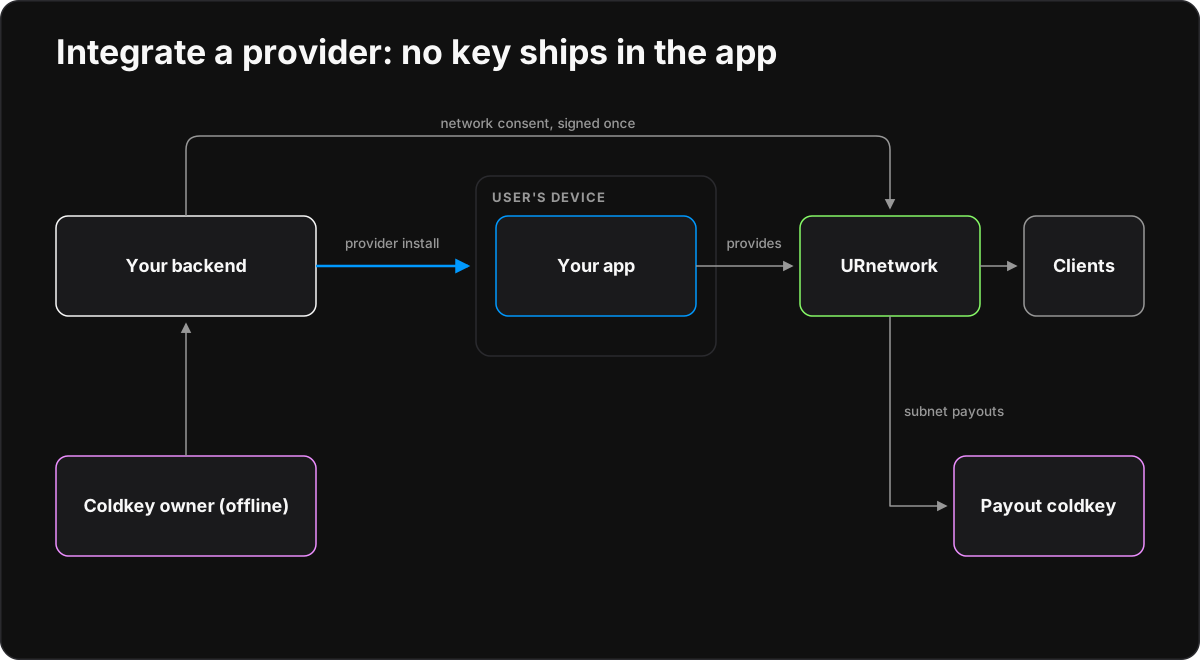
A provider integration splits the work three ways, and no key ships in an app.
- Your backend holds your network's root JWT. It provisions one provider install per installation, delivers each installation's scoped client JWT and requests the wallet consent messages.
- The coldkey owner signs each wallet consent offline, with their own wallet tool such as btcli, the polkadot.js extension or subkey. The coldkey secret never reaches your backend or the app.
- The app runs the SDK's local Device with its client JWT, provides publicly and shows the status. It never holds the root JWT and never signs or submits a consent.
| Value | Kept by | Purpose |
|---|---|---|
URNETWORK_ | Your backend's secret store | Provisions provider installs and maps them to the payout wallet |
| Payout coldkey address (ss58) | Your backend's configuration | The fixed payout wallet: public, but set only by the backend |
| Coldkey secret | Its owner, offline | Signs the wallet consents |
client.jwt | The installation's private state | The installation's scoped credential, which the SDK refreshes |
Payouts go to the coldkey as Bittensor subnet payouts. The app reads the payout wallet only to display it, and it has no payout settings of its own.
Consent comes first
Providing shares the user's connection, so your app must ask before it provides and must let the user stop at any time. Every example shows this disclaimer verbatim, and the contract pins its SHA-256:
Consent disclaimer: an app that integrates a URnetwork provider must collect the user's consent before it provides.
Providing shares the user's internet connection: other URnetwork users' traffic exits through the user's device and IP address.
This example starts providing without asking, because the consent screen belongs to your app.
Console examples print it at start. GUI and Android apps show it next to the control that starts providing. The examples have no consent screen of their own, because that screen belongs to your app, and they do not cap bandwidth.
Provision provider installs
Each installation is a provider install: a top-level client of your network that only provides. Your backend creates it with POST /network/ and the root JWT, sending a description, a device spec and the provide_ flag, but no client_id or source_:
{
"description": "provider user:alice:laptop-1",
"device_spec": "urnetwork-examples/The answer carries the new client_id and its scoped by_, which the backend delivers to the installation as its client.jwt. The server keeps the flag with the client for its life:
- The provider install never appears in your network's peer list (
GET /network/and the peer change stream), and it never receives the list.peers - It does not count toward the cap of 100 top-level clients, nor toward the 100 recently active top-level clients that keep the peer list on.
- Its creation is exempt from that cap and from your plan's concurrent client check.
The flag does not make the device provide. The SDK declares provide intent on its own connections whenever the device provides publicly, and the client limit rules below apply to connections that declare it. Apps set nothing for it. A provider install that connects without providing publicly counts as a normal client.
To reissue a token, send the stored client_id with the description and device spec. The server ignores provide_ on a reissue, so send the flag only to create. A client that has not connected for 30 days is deactivated: its reissue answers Client does not exist., and the backend then provisions a new provider install.
Two kinds of client are not provider installs. A person's own device that also provides declares intent by itself and stays a network peer, so do not set the flag for it. A child client, provisioned with a source_, is never offered to other users as a provider and earns nothing.
The Go backend tool runs all of this as wallet provision <installation-key> <client-jwt-file>, and the contract shows the same requests with curl.
Providers and the client limit
Providers are exempt from your plan's concurrent client limit while they qualify and once they have qualified. A provider qualifies with three things:
- the public provide mode, with its provide keys registered;
- a passing egress-health probe;
- once it has 12 hours of history, a 12-hour reliability of at least 0.7.
A new provider has a 1 hour grace to qualify, and the grace never closes before at least one egress probe has been attempted. A qualified provider is checked again every 4 hours. Each client gets one qualification attempt per 8 hours.
A provider that does not qualify takes a normal client slot when one is free. When none is free, the platform may disconnect it. The SDK then holds off every platform connection of that client for 15 minutes plus up to 5 minutes of jitter, and reconnects by itself. Meanwhile the app shows client limit, retry at HH:MM UTC, the retry time in UTC, rounded up to a whole minute. The platform tells the client nothing else about qualification.
Map the payout wallet
The payout wallet is your fixed Bittensor coldkey, as an ss58 address. The server pays a provider client only through a wallet mapping consent that the coldkey owner signed. There are two kinds:
| Consent | One signature covers | Use it for |
|---|---|---|
| Network consent | Every provider client of your network, now and in the future | Apps that embed a provider: the owner signs once per network |
| Per-provider consent | One provider client | A client that earns to another coldkey, such as one run by an independent signer |
For each provider client and each epoch, a per-provider consent in force wins; otherwise the network consent pays. A consent covers the epochs from its from_epoch through its through_, at most 65,536 of them, and it only looks forward. To change the coldkey, sign a new consent of the same kind; earlier epochs keep the earlier coldkey. There is no unsigned revocation.
Each consent takes four steps, and only the signature comes from outside your backend:
- Read the current epoch
EfromGET /sn/epoch. - Request the message with the root JWT:
POST /sn/with the coldkey and the epochswallet/ network-consent E+1throughE+65536, orPOST /sn/with awallet/ consent client_idas well. - The coldkey owner signs the exact message bytes within five minutes.
- Submit the coldkey, the message and the signature to
POST /sn/wallet, with the sameclient_idfor a per-provider consent. Check the mapping withGET /sn/wallet.
The signature is sr25519 in the substrate signing context over the message's UTF-8 bytes, either raw or wrapped as <Bytes>…</. The wrapped form is what a Polkadot extension's signRaw of type bytes signs. The signature is 64 bytes, sent as hex. A network consent message starts with Approve URnetwork network wallet mapping, and a per-provider one with Approve URnetwork provider wallet mapping.
The Go wallet tool runs both kinds: network-challenge and network-accept for the network consent, challenge and accept for one client, and show to list them. A server without network consents answers POST /sn/ with 404; per-provider consents still work there. A third, lower mode, the hotkey delegation, comes with a later server and SDK change. Apps only label it (hotkey).
Inside the app
Each installation keeps its state in one private directory: client.jwt, instance-id, identity.json and the SDK's bounded logs/. Console examples take the directory's absolute path from URNETWORK_; GUI and Android apps use their private application data. On POSIX the directory is 0700 and its files 0600, and every file is replaced atomically. identity.json keeps the provider's keys across restarts.
The app's lifecycle is short:
- Show the consent disclaimer and load the installation state.
- Create the Device with the SDK's extender-aware constructor and the installation's key material. On the first run there is none: the Device makes a new identity, which the app saves as
identity.json. - Save each refreshed token as
client.jwt, and stop on a logout. - Set the provide mode to public. The SDK then declares provide intent by itself.
- Read the status every second, and the payout wallet at start and every 10 minutes.
Every example shows the same four fields, with the same rules:
| Field | Shows |
|---|---|
| Status | stopped, client limit, paused, providing or starting, checked in that order |
| Clients served | Distinct clients that opened a contract with this provider since the app started |
| Data provided | Bytes relayed for clients in both directions, in binary units |
| Payout wallet | The coldkey with its scope: (this provider), (network), (hotkey) or (another provider) |
Console examples print a status line whenever the status, the clients-served count or the payout wallet changes, and otherwise once a minute:
status: providing | clients served: 3 | data provided: 12.4 MiB | payout wallet: 5GrwvaEF5zXb26Fz9rcQpDWS57CtERHpNehXCPcNoHGKutQY (network)providing needs provide enabled and a connection to the platform. The wallet reads checking before the first read, unavailable if that read fails and not set when no wallet is mapped. The address above is the public Substrate development account, used only as sample data. The contract's golden vectors pin every text exactly.
The extender role
While it provides, the Device also runs the provider extender role, which is on by default. It listens on TCP 443 and on UDP 443 and 4053, so that clients that cannot reach the platform directly can connect through this provider. Only the subnet's command-line provider (provider provide) also listens on UDP 53, and clients try both UDP 53 and 4053. Windows and macOS may ask the user to allow incoming connections the first time. On Linux, a process without the privilege to bind these ports keeps providing without the role. The Android and iOS builds of the SDK do not include it.
One setting turns the default off: DefaultProvideExtender set to false.
| Binding | Default off |
|---|---|
| Go | DeviceLocalSettings., or false as the constructor's last argument |
| gomobile | Sdk. (Java, Kotlin) or SdkNewDeviceLocalWithProvideExtender (Swift), with the default false |
| C ABI | urnet_ with default_ false |
| C++ | urnet:: with the default false |
The user's own choice, set with SetProvideExtender, still overrides the default. ProvideExtenderEnabled set to false is the hard switch: the role never runs. Both settings, and the constructor that takes them, are in the SDK from the first release after sdk c638dfa8.
Run in the background
The console examples share three background templates: a systemd user service on Linux, a launchd agent on macOS and a scheduled task on Windows. Each template names the installation's state directory, so the service definition holds a path, never a credential. All examples use the same exit codes:
| Exit code | Meaning |
|---|---|
| 0 | A requested stop, such as Ctrl-C or SIGTERM |
| 78 | A configuration or credential problem that a restart does not fix |
| 1 | Any other failure |
Supervisors restart a provider after a failure, but not after 0 or 78. launchd has no rule per exit code: after 78 it keeps retrying once a minute until the state is fixed.
The GUI and Android apps keep providing on their own. Electron and Tauri stay in the system tray when the window closes and offer start at login. Android provides from a foreground service that the user starts, and pauses providing on metered networks.
Examples
Each example's README has build and run steps for every OS it supports and a credential-free self-test. The console examples run on Windows, macOS and Linux. The Go provider is the reference implementation.
| Platform | Example | Built on |
|---|---|---|
| C | C provider | The C ABI |
| C++ | C++ provider | The C ABI |
| C# | C# provider | The C ABI, through .NET |
| Go | Go provider | The Go SDK |
| Java | Java provider | The C ABI, through JNA |
| JavaScript | JavaScript provider | Node and the native companion |
| Kotlin | Kotlin provider | The C ABI, through JNA |
| Python | Python provider | The C ABI, through ctypes |
| Ruby | Ruby provider | The C ABI, through FFI |
| Rust | Rust provider | The C ABI, through the Rust crate |
| Swift | Swift provider | The C ABI, through a SwiftPM C module |
| TypeScript | TypeScript provider | Node and the native companion |
| Electron | Electron provider | A desktop app on the native companion |
| Tauri | Tauri provider | A desktop app with the Rust crate in process |
| Android | Android provider | The gomobile AAR, in a foreground service |
Release availability: the provider examples need an SDK release with the provider APIs: the extender-aware constructor, the client limit status and the wallet's consent scope. They are in the SDK from the first release after sdk c638dfa8. Install the SDK covers the packages, and the examples browser has each language's other examples.