
How URnetwork works
URnetwork is a privacy network powered by its members. Your traffic exits through another member's device, not a datacenter VPN server. Websites see that device's IP address instead of yours. This overview explains the path and what each party can see.
The exits are thousands of member devices across more than 2,000 real cities in 90+ countries, not virtual IPs served from a handful of datacenters. The live counts are published at api.bringyour.com/stats/last-90.
The path
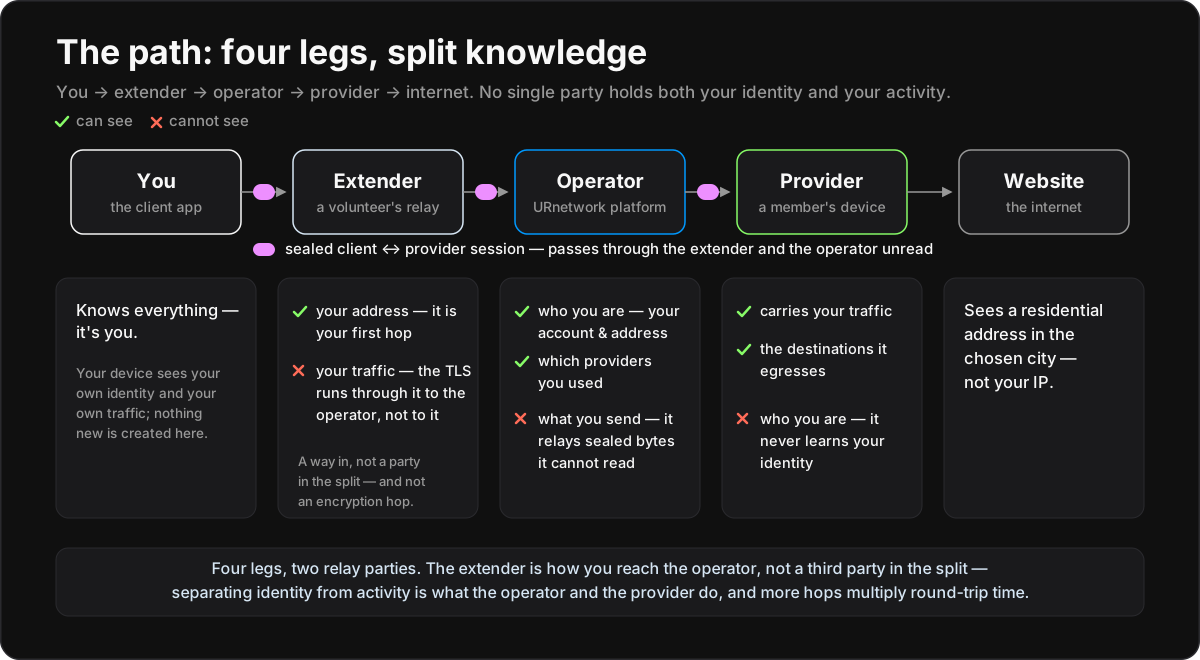
Traffic takes four legs: you → extender → operator → provider → internet.
- Client. The app or SDK instance on your device. A network is URnetwork's word for your account, the billing and identity unit; it can hold many users, devices, and clients.
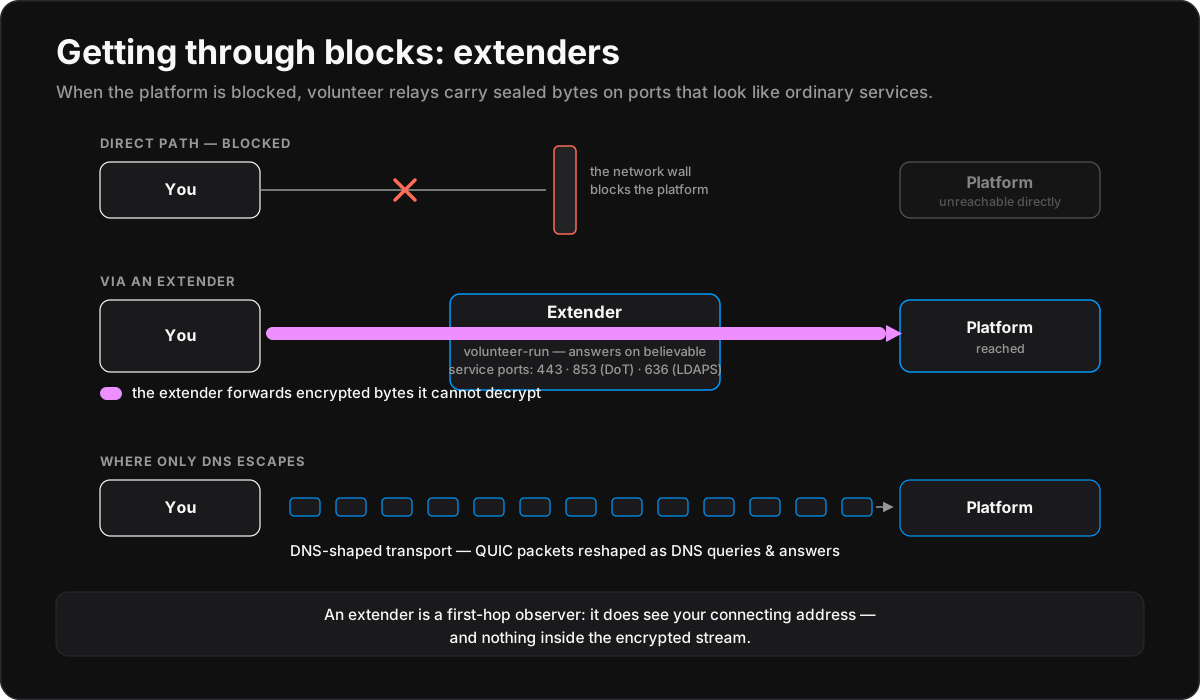
- Extender. A volunteer-run forwarding hop on an independent address, and the first leg. It forwards your encrypted session to the platform without terminating it, so it carries bytes it cannot read. As your first hop, it does see your IP address.
- Operator. BringYour, Inc., the party that coordinates the network. Its platform (
connect.bringyour.com,api.bringyour.com) authenticates clients, matches you with providers, relays traffic, and handles contracts and payments. - Provider. A member device that shares its internet connection and forwards your traffic to the internet, so websites see a residential address in the provider's city.
The operator and the provider are the two relay parties, and the design splits knowledge between them. The extender is a reachability hop outside that split and adds no encryption of its own. It keeps the network reachable where the platform is blocked.
Who can see what
With the seal on, no single party holds both your identity and your activity. That statement rests on two properties with different scopes, and only the first holds without touching a setting.
The provider never learns who you are. The operator stands between you and the provider, so the provider sees a device id and the destinations it serves, never your address. This holds on every relayed path, with no setting to get wrong.
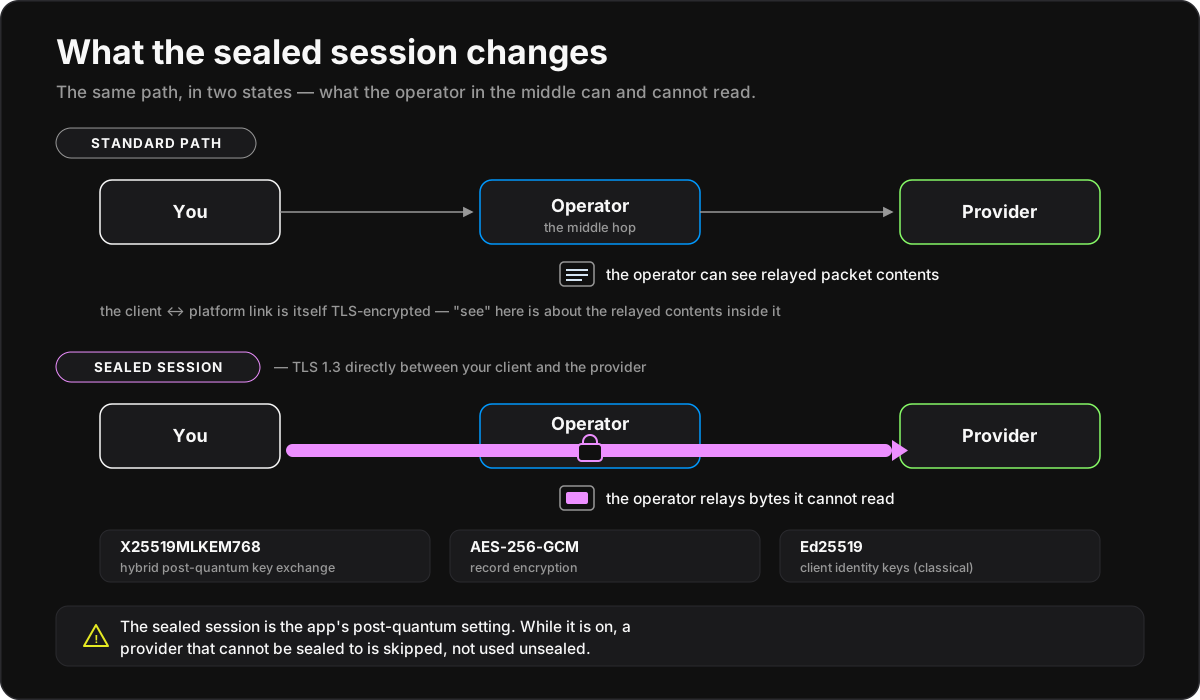
The operator cannot read what you send, once the session is sealed. The native apps seal the client↔provider session end to end when you switch on Post Quantum Encryption, and the operator then carries ciphertext plus timing and volume. The switch ships off, so a fresh install runs the standard path in the table below: the operator relays packets it can read, and what keeps your destinations out of its records is discipline, not encryption.
The browser extension and the proxy endpoints have no sealed session at all. That is scope, not a default, and it is architectural: a browser or a plain proxy client cannot run the network's engine, so the operator runs the client's device remotely and translates between protocols — a seal started from that device would begin inside the operator, the party it exists to blind. The implementation traded the seal for reaching those platforms at all. There, storage discipline pinned by a test, not encryption, keeps the operator from accumulating your destinations (threat model §2.4).
| Mode | Operator sees | Provider sees | Default and availability |
|---|---|---|---|
| Relayed sealed | account/source connection, provider association, ciphertext and timing/volume | destination traffic, device/contract id, not your real source IP | the native apps, opt-in: switch on Post Quantum Encryption, which ships off |
| Relayed standard | account/source connection, provider association, inner destinations and packet bytes | destination traffic, device/contract id, not your real source IP | the native default, out of the box, since the seal ships off; the browser and proxy paths always; with the seal on, a provider that cannot be sealed to is skipped rather than served here |
| Direct | less relay involvement | your real source IP and destination traffic | opt-in, by disabling Strong Anonymization |
The table is canonical. The threat model works the same split against named adversaries, including a hostile operator and colluding providers.
Why four legs
Speed is a design goal, not a concession. Every extra hop lengthens the round trip between you and the internet, which is why long chains hurt for everyday use. Bounding the path at four legs keeps the knowledge split at streaming-class speed. URnetwork puts average streaming speed on the network at 40 Mbps+.
The formal description is a latency-bounded multi-hop with data separation. The wire protocol supports chaining additional provider intermediaries; the shipping network uses the single-provider path. Other designs make other trades. Tor pays for longer chains in latency. Apple's Private Relay is an encrypted two-party split, inside closed implementations, with both parties selected and paid by one company. Most VPNs attempt no split at all. The comparison map covers these product by product.
What happens when you connect
- Sign in. The app signs in with a token that expires in about a day and refreshes automatically, so a stolen token goes stale fast. Engineers call it a JWT. Accounts can use email or phone, Google or Apple sign-in, a Solana or Bittensor wallet signature, a seed phrase, or a one-tap, email-free Instant Account whose whole credential is a recovery seedphrase. The phrase is comparable to Mullvad's numbered accounts and survives a reinstall; the server generates it, shows it once, and keeps only hashes, so losing it loses the account.
- Reach the platform. The client opens an encrypted channel to the platform: TLS over WebSocket, or QUIC/HTTP-3 where the network allows it. The channel runs through an extender and terminates at the platform. Direct routes are raced first; the extender leg takes over when they fail.
- Find providers. The client asks for providers matching your selection: best available, a country from the list, or a city you find by typing its name into the search box. The platform scores candidates continuously on reliability and measured speed and returns a ranked set.
- Open contracts and go. The client holds a window of several providers and balances your connections across them. The default profile runs two windows: a quality set of 2–6 providers for HTTPS, and a speed set of 1–2 for everything else. Three to eight providers are typically live. Connections to a given site stay pinned to one provider, so that site sees one stable address for your whole session. A provider that underperforms or drops is replaced; the rest of the window absorbs its work. Every byte moves under a transfer contract, the accounting unit that meters what each provider carries.
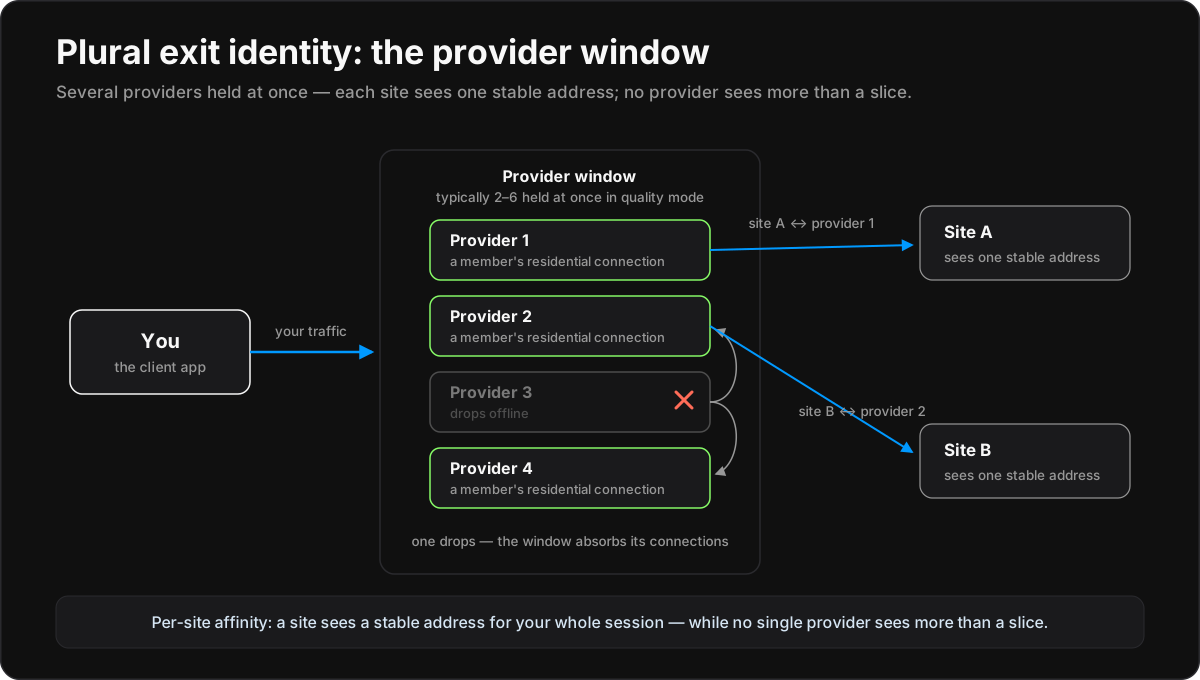
Your exit identity is plural: several providers at once, churning over time, so no single exit sees more than a slice of your browsing. The window is also the speed strategy: residential connections vary more than datacenter servers, and shedding slow ones keeps streaming smooth.
Encryption
The client↔platform channel is always encrypted: TLS 1.3 or QUIC.
The sealed session. With the seal on, the app encrypts traffic all the way to the provider, so the operator relays bytes it cannot read. What reaches it is ciphertext plus timing and volume. The control is named Post Quantum Encryption in the connect drawer of the Android, iOS, macOS, Windows and Linux apps, and it ships off in all five: a fresh install is unsealed until you switch it on. The seal is a TLS 1.3 handshake directly between client and provider, with the hybrid post-quantum key exchange X25519MLKEM768 and AES-256-GCM per message. Identity keys are Ed25519; "post-quantum" refers to the key exchange only.
Scope: with the seal on, a provider that cannot establish it does not carry your traffic at all. The client refuses to send application data in the clear rather than quietly falling back — a provider that cannot be sealed to is skipped, not used unsealed. Every current provider build supports the seal, so this mostly affects older builds, and it costs availability rather than confidentiality. With Post Quantum Encryption off, as it ships, the client opens no session to the provider at all, and every packet takes the standard path, where the platform can read packet addresses and contents.
Limit: no app yet reports whether a given connection is sealed. That gap is real but it is no longer the dangerous one — you cannot be silently downgraded while the seal is on. This and everything else URnetwork does not defend against is set out in the threat model.
Strong Anonymization, and direct mode. A provider sees the destination addresses of the traffic it serves, as your ISP does today. It does not learn who you are: by default it never sees your real IP, only the platform does. That default is the Strong Anonymization switch in the connect drawer, which ships on. Turning it off opts into direct mode: the client talks straight to the provider and throughput goes up. The cost: that provider now sees your real address. Hosted profiles force direct mode off regardless.
What each party can see
| Party | Sees | Does not see, or does not keep |
|---|---|---|
| Operator (platform) | your account; your address at the moment you connect; a coarse city/region/country derived from it; which providers you used; byte counts; with the seal on, ciphertext with its timing and volume, and with it off, as it ships, the packets themselves | packet destinations and contents, once the seal is on; your raw address (a keyed block-hash instead); any destination field in the transfer ledger |
| Provider | destination IPs/SNI of the traffic it carries out; a device id carried by the contract | your identity or real IP on the relayed paths; only the operator can resolve the device id to an account |
| Extender | encrypted bytes; your IP | anything inside the tunnel |
| Website | a residential provider address | your IP; your ISP identity |
Behind the operator row:
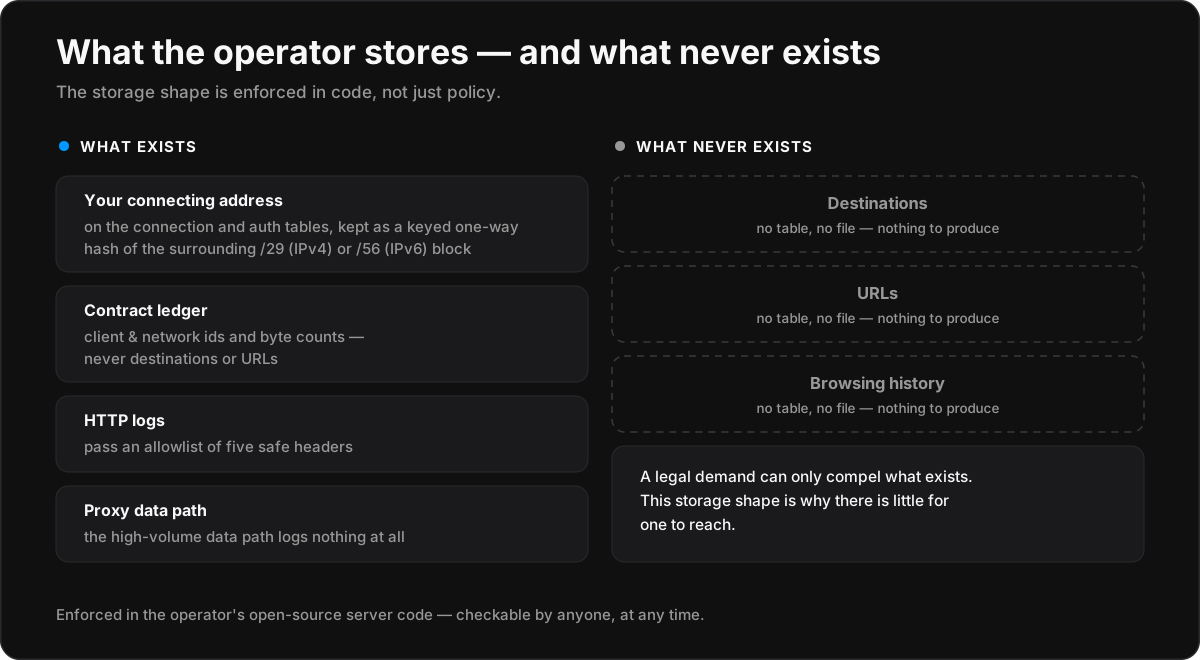
- The stored form of your connecting address is a keyed one-way hash of the surrounding /29 (IPv4) or /56 (IPv6) block, not the address itself. A coarse city/region/country derived from the address is kept per connection.
- The discipline is in code, not only policy. HTTP logging passes a five-header allowlist. The transfer ledger records client and network ids and byte counts, with no destination, host, URL, SNI, port or domain field to write into. The proxy data path logs nothing, pinned by a regression test.
- The seal makes your traffic unreadable to the operator. Storage discipline covers what the operator still sees (provider associations, byte counts, coarse location) and stands in where there is no seal: the browser extension, the proxy endpoints, and the native apps with the seal off.
- Limit: these are properties of the records the code writes. The ingress load balancer's access logs were never audited, and address- and SNI-bearing lines reach service stderr, whose production destination is not established. Full record: the threat model.
Open source, and what is not audited
The entire stack is open source: apps, SDK, protocol engine, and the operator's own server code, so the mechanisms described here can be read rather than taken on trust. Open source proves the design, not which build is deployed.
No independent audit covers the protocol, the connect engine, or the operator's server code, where the privacy claims live. Two 2025 third-party assessments cover other surfaces. One is an independent penetration test of the web application and API (April–May 2025). The other is a Leviathan Security Group MASA AL2 assessment of the Android app, which passed; Leviathan scopes it as not a holistic security evaluation. Open code under permanent scrutiny is URnetwork's answer to the yearly point-in-time audit. Full record: the threat model.
Safe to share: the ip_security layer
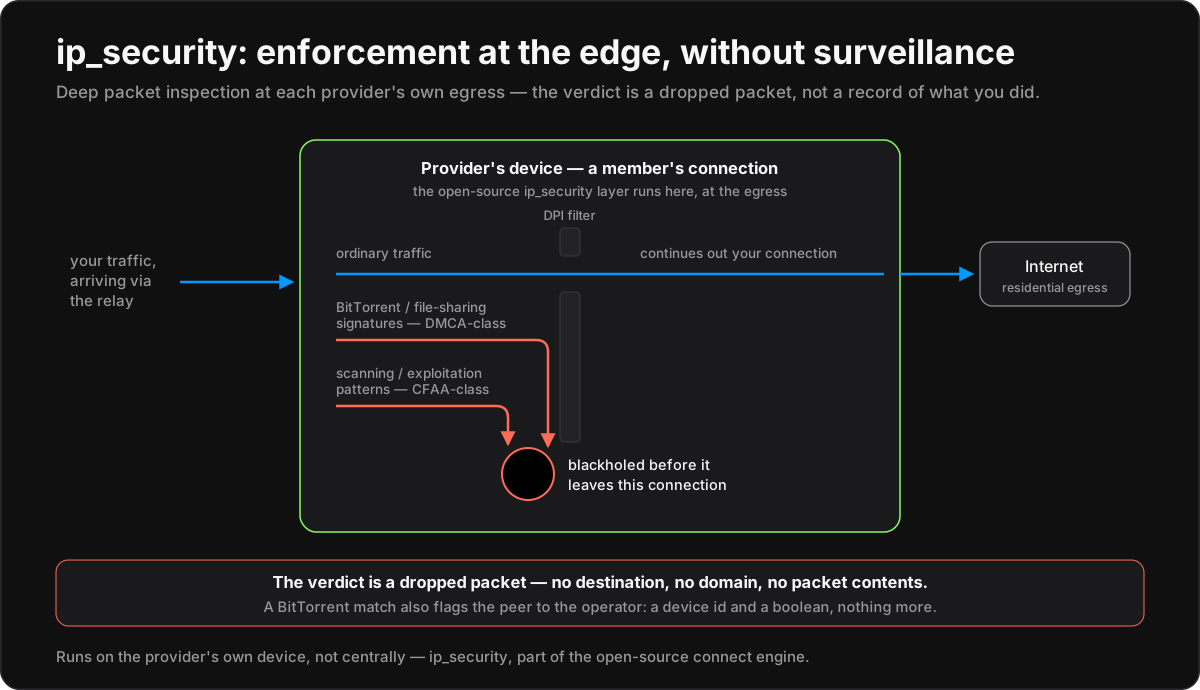
Sharing a connection should not mean inheriting a stranger's legal risk. The provider client ships ip_security, an open-source traffic-security layer in the connect engine and one of its largest components. It inspects the provider's own egress, its exit to the internet. Risky traffic is blocked before it leaves the member's connection:
- DMCA-class filtering. A stateful detector recognizes BitTorrent and file-sharing signatures and drops opaque traffic matching no legitimate protocol, so infringing peer-to-peer transfers do not exit the member's line.
- CFAA-class filtering. Unauthorized-access, scanning and exploitation patterns are blackholed, so the connection is not the launch point for someone else's intrusion.
- A detector built not to see. The file-sharing check clears the server name from its own flow key. It decides on addresses, ports and a flow's opening bytes, and tallies its counters by protocol and port, never by address.
A match produces a dropped packet. A BitTorrent match also emits an abuse flag to the operator: the peer's device id and a boolean, with no destination, domain or contents. The operator ships no handler for the flag today, so nothing is stored on receipt. Opaque-protocol drops are silent, with no report.
The layer runs at the edge, on both sides of it: on your device when you connect, so traffic the network will not carry never reaches a provider, and on the provider's device, where traffic exits. The operator does not inspect traffic centrally, and the seal does not bypass the filter, because the filter runs at the endpoints the seal connects. With the kill switch on (an explicit toggle in every app, default on in the browser extension), blocked traffic stops instead of falling back to your own connection. Most countries have CFAA- and DMCA-family laws; one standard answers them at every exit, and URnetwork follows the law wherever it distributes. The filter is maintained, not frozen: its threat lists are regenerated at release from public malware, abuse and botnet feeds (Spamhaus DROP, abuse.ch's botnet tracker, Emerging Threats and others), so an up-to-date app blocks the latest known-bad address space. The terms of service cover providing.
Getting through blocks
Extenders carry the path through local and regional firewalls. Each one answers TLS on believable service ports (443, DNS-over-TLS 853, LDAPS 636, and others) and presents to scanners like a misconfigured CDN. Each is hard-coded to forward the encrypted stream to the platform on an address of its own, so blocking connect.bringyour.com does not block the way in. The client rotates through generated extender personas, with randomized packet fragmentation and reordering, until one works. Where only DNS escapes, a DNS-shaped transport reshapes QUIC packets as DNS queries and answers. Anyone can run an extender.
Providers and coverage
Locations are presence-backed: a city is offered only while a member's device is online in it. The platform geolocates the connection it observes; a provider cannot declare its own city. An address that looks like a datacenter, a VPN or a re-announced range is demoted rather than trusted. Limit: no outside party has measured the fleet, and nothing verifies that the providers offered to one client are independent of each other or of the operator. See the threat model.
Providing is opt-in sharing of spare bandwidth: off until you switch it on, Wi-Fi-only unless you allow cellular, and pointed at either public traffic or your own devices alone. Public traffic is metered: the platform stamps each transfer contract with a secret only that provider holds, so the provider can check a contract is genuine and for the audience it agreed to. The escrow is denominated in bytes; both ends report what they carried, and the settled figure is their average within a tolerance. Providers participate in the UR protocol; ur.xyz documents rewards, and this page does not restate them. Free tiers exist because paid members fund the network's growth. Anyone can provide.
Plans and the operator API
There are two plans: a free tier with a daily data allowance, and Pro with a large monthly allowance, more concurrent clients, and the proxy and WireGuard conveniences. Pro can be paid with on-chain USDC from a wallet. The allowance is metered, not throttled: when it runs out, the network stops opening new transfers rather than slowing you down. The tunnel goes quiet, your own connection is untouched, and the allowance refills on its cycle. Current numbers are on ur.io/products, machine-readable at GET https://api.bringyour.com/x402/skus.
Everything the apps do goes through the public operator REST API (auth, devices, provider discovery, subscriptions, stats), documented in the API reference. Agents get first-class access: an MCPv2 server at mcp.bringyour.com (OAuth; providerLocations and fetch tools) and x402 pay-per-need purchasing. See ur.io/agents.
Fallback endpoints: HTTPS, SOCKS5, WireGuard
For software that cannot embed the SDK, the operator runs bridge endpoints: an HTTPS CONNECT proxy, SOCKS5, and a WireGuard endpoint for stock WireGuard apps. SOCKS5 supports CONNECT and UDP associate; BIND is not supported, and UDP datagrams over 2 KiB are dropped by design. Limit: the WireGuard path assigns one stable tunnel address from a platform-allocated private pool, not your real IP. That stable address lets one client be correlated across providers, and the endpoint hands the client a fixed public resolver (1.1.1.1). The apps and SDK remain the most private way to use the network.
Where to go next
- Set up: the getting started guides for Android, iOS, macOS, Windows, Linux, the browser extension, and the SDK.
- Per-platform depth: the tour docs.
- Other products: the compare docs and the comparison map.
- The protocol: ur.xyz for the whitepaper, economics, and provider rewards.