
Embed
Whitelabel URnetwork into your own apps: your backend provisions a client for each installation, your apps embed the SDK, and no root credential ships in an app.
URnetwork runs on every major platform, including Android, iOS, macOS, Windows and Linux, and integrates as a native library inside your app with minimal permissions. With tunneled sockets it needs only network access: no VPN permission, no device-wide tunnel and no administrator rights.
Most apps replace their own sockets with tunneled sockets from the Device, as Socket shows. You can also tunnel the whole system, which takes the platform's tunnel permission, or pass custom messages between your installations with Messages.
An Embed plan is required. Embedding URnetwork in your own product needs an Embed plan for your network. Each plan starts with a review of your project and a contract, and then our team enables Embed for your network. Request one on the Services page, with your monthly active users and monthly data budget.
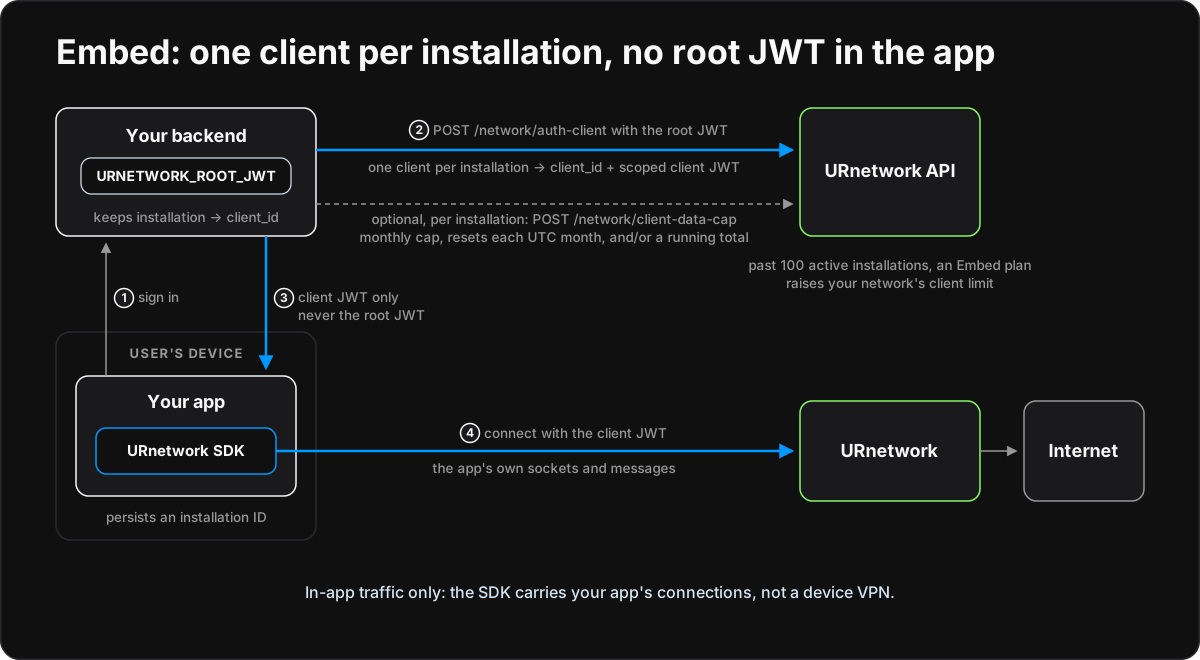
An embed integration puts URnetwork inside your own product, under your own brand, and it has two halves of equal weight. Your backend provisions a client for each installation of your app and sets its data caps. Your app packages the SDK and starts a Device with that installation's client JWT. The Device carries only your app's own traffic; what your app sends through it continues in Socket. Runnable examples cover twelve languages and three platforms of their own: Electron, Tauri and Android. They all implement the embed contract, which holds the exact rules; this page explains how the parts fit.
Who holds what
An embed integration splits the work three ways, and no key ships in an app.
- Your backend signs in your users and holds your network's root credential. It provisions one client per installation, sets each client's data caps, delivers each installation's scoped client JWT and removes the clients you no longer want.
- Your app embeds the SDK, runs a local Device with its installation's client JWT, sends its own traffic through it and shows the status. It never holds the root credential, never sets caps and never provisions or removes clients.
- URnetwork enforces each client's data caps and your network's client limit.
| Value | Kept by | Purpose |
|---|---|---|
Root credential: an API key or URNETWORK_ | Your backend's secret store | Provisions clients, sets data caps and removes clients for the whole network |
Client map, user: to client_id | Your backend's private state | Decides which installation may obtain or renew which client; it stores client IDs, never tokens |
client.jwt | The installation's private state | The installation's scoped credential, which the SDK refreshes |
instance-id | The installation's private state | One UUID for the life of the installation, and the installation ID your app sends your backend |
| Data caps | URnetwork, set by your backend | Optional monthly and running-total byte caps for each client; the app reads its own |
| ACL group | URnetwork, set by your backend | default or isolated: whether the client is in your network's peer list |
Provision a client for each installation
Your backend provisions with POST /network/ and the root credential: the same request the integration contract uses for a top-level client.
One client per running installation
The platform keeps one live connection per client_id. When a second installation connects with the same client, it displaces the first, and the two keep knocking each other off. So every installation that can run at the same time as another needs its own client.
Your backend's map keeps each installation's client_id under one composite key: user:. The installation ID is the installation's instance-id, which the app sends. The service user ID comes from your own sign-in, never from the request. That user part is what lets your backend refuse another user's installation: whatever installation ID a caller presents, it only reaches a key under the caller's own user, so your backend never reissues another user's client. A service whose users only ever run one installation may key by user: alone.
An app picks its own installation ID, so your backend bounds how many installations one user may create. The token server allows 5 by default.
The root credential
Use an API key as your backend's credential in production. Create one with POST /account/, called with a network JWT from sign-in. The key begins urn_ and is shown only in that answer. GET /account/ lists your keys without their secrets, and POST /account/ revokes one.
An API key authenticates as your network exactly like a network JWT and carries no client_id, so it is the bearer credential for every request on this page. Its scope is the same: the whole network. It is not narrower, and anyone who holds it can provision clients, change caps and remove clients. Treat it like a production database password: keep it in your backend's secret store, give it only to the service that provisions, and keep it out of apps, logs, error messages, URLs and repositories.
To rotate a key, create a new one, deploy it to your backend, then remove the old one. Remove a leaked key at once. Removing a credential stops it from provisioning; it does not cut off a user. To do that, pause or remove their client.
Provision and reissue
An installation's first sign-in provisions a new client. Send description and device_spec, and neither client_id nor source_:
{
"description": "embed client",
"device_spec": "urnetwork-examples/The answer carries the new client_id and its scoped by_. Map the client_id to the installation's key and deliver the JWT, which the installation saves as client.jwt. Later sign-ins reissue: send the stored client_id with the same description and device spec, and the answer carries a fresh JWT for the same client.
A client that has not connected for 30 days is deactivated, and its reissue answers Client does not exist. Drop that mapping, provision a new client and apply the installation's caps to it again.
Check every answer before you store or deliver anything: the HTTP result, error, both success fields, that the JWT's client_id claim equals the answer's client_id, and that your map does not already give that client_id to another key. A refusal answers 200 with error.. URnetwork can see the description, so keep your users' identifiers out of it; your map already links each client to its user. The contract shows the requests with curl.
The client limit
A network can have 100 active top-level clients by default. Exactly, the limit counts the network's clients that are active, have no source_ and are not provider installs. With one client per running installation, that is your active installations. A client stops counting when you remove it, or when it is deactivated after 30 days without connecting. Child clients and provider installs never count.
Past the limit, provisioning a new client is refused with error. and the message Client limit exceeded. An Embed plan raises your network's limit: request one on the Services page, with your monthly active users and monthly data budget. A refusal with error. comes from a second limit, your plan's cap on concurrently connected top-level clients; where the platform can quote an upgrade, the call answers HTTP 402 with its terms instead. An Embed plan sets your network's allowance for both limits.
Check your network with GET /network/ and the root credential. It answers enabled, whether the team has enabled Embed for your network; client_limit, your network's limit; and active_, the exact number that limit counts.
Data caps for each installation
Each client has two optional caps. Set either, both or neither:
- The monthly cap limits the bytes the client uses in each UTC calendar month. It resets at 00:00 UTC on the first of the month, not at midnight in your user's time zone.
- The running-total cap limits the bytes used since the total started: at your first cap request for the client, or at its last
reset_total. It never resets on its own: raise or clear it, or start a new total withreset_total.
At a cap the client gets no new transfer contracts until the month rolls over, the cap is raised or cleared, or the total is reset. That is a hard stop, not a throttle, and its new contracts are refused the way an empty balance is, so read the caps to tell the two apart. Usage is counted when transfer contracts settle and rolled up within about two minutes, so the used counts lag live traffic, a cap takes effect within about two minutes of being reached, and a client can go past a cap by up to the size of its contracts that are still open: leave headroom. Metering never over-counts; each contract is counted at most once. A cap of 0 pauses the client at once, and the pause lasts until that cap changes. A new month does not lift a monthly cap of 0.
Every byte the client pays for counts toward its caps; no traffic is exempt. Lowering a cap below what the client has already used stops it within the same two minutes, and raising or clearing a cap lets it resume. At a cap your app's status reads data cap reached, or paused for a cap of 0.
Set caps with POST /network/ and the root credential. A client JWT is refused, and the client must belong to your network. Each limit field merges, so one call changes one cap without touching the other. Omit a field to keep its value, send null to clear that cap, or send a whole number of bytes, 0 or more, to set it. In the table, C is the client's client_id:
| Body | Effect |
|---|---|
{"client_ | 10 GB a month; the running-total cap is unchanged |
{"client_ | Clears the running-total cap; the monthly cap is unchanged |
{"client_ | Pauses the client until the monthly cap changes |
{"client_ | Starts a new running total; both caps are unchanged |
The API counts whole bytes; show GB or TB only in your interface. Read caps and usage three ways:
GET /network/with the root credential reads any client of your network.client-data-cap?client_ id=C - The same request with a client JWT reads that client. This is how your app shows its own data.
GET /network/with the root credential pages through every client that has a cap set.client-data-caps limittakes 1 to 1000, and you pass each answer'snext_cursorback ascursoruntil it isnull.
Each answer carries both caps, the bytes used this month and in the running total, the period dates, and capped with its reason. Monthly usage is metered for every client, capped or not, so the single read also serves your billing. There are no threshold notifications: your backend and your app poll these reads.
Caps belong to a client, so with one client per installation they apply per installation. To give one user one budget across several installations, set each installation's caps from that user's budget, read usage across the user's clients with the bulk read, and adjust.
The data-cap routes work once the team has enabled Embed for your network. Until then they answer with the error. Embed isn't enabled for this network. If Embed is later disabled, caps you already set keep applying.
Keep installations out of each other's peer list
Every top-level client is a peer in your network: it can appear in the network's peer list and receive that list. An embed app usually wants the opposite, so each client has an ACL group:
default: the client is a normal peer. New clients start here.isolated: the client never appears in your network's peer list, receives no peer list itself, and does not count toward the 100 recently active clients that keep the peer list on. It still counts toward your client limit and your concurrent connection limit.
Set the group with POST /network/ and the root credential, for example {"client_, and read it with GET /network/, using the root credential or the client's own JWT. Set it when you provision, before you deliver the client JWT: a client isolated while it is connected stops receiving peer updates, but keeps the list it already had. The token server and backend tools isolate new clients by default (URNETWORK_). Messages finds other clients through the peer list, so an installation that uses Messages stays in default.
Like the data-cap routes, the ACL-group routes answer Embed isn't enabled for this network. until the team enables Embed for your network, and groups you already set keep applying if Embed is later disabled.
Pause, remove or delete a user
- Pause an installation with a cap of
0. It gets no new transfer contracts, and its data stops within the life of the contracts already open. Set the cap back to resume. - Remove a client with
POST /network/andremove-client {"client_. The platform refuses its client JWT at the next connection, so the installation loses access when it reconnects. Drop the mapping as well. If that installation signs in again, your backend would provision a new client, so to keep a user out, refuse their sign-in in your own service.id": C} - Delete a user by removing the client of each of their installations and dropping those mappings.
Coming from another whitelabel SDK, the usual controls map like this:
| Elsewhere | Here |
|---|---|
| Disable a user | A cap of 0 on each of their installations |
| Delete a user | Remove each installation's client and drop its mapping |
| Account expiry | No expiry; a client idle for 30 days is deactivated |
| Device limit | Your backend's bound on installations per user; the token server allows 5 |
| Per-user data limit | Caps on each installation, budgeted from the user's limit |
| Hide users from each other | The isolated ACL group |
The token server and backend tools
The examples include a minimal backend in two forms:
- The Go token server, in
go/, has the shape of your service's sign-in endpoint. Your app posts itsembed/ server instance-idtoPOST /urnetwork/, with a demo session as the bearer token. The server provisions or reissues that installation's client, applies optional default caps to a new client, and answers with theclient-token client_id, theby_and the current caps. It uses only the Go standard library, allows 5 installations per user by default and listens onclient_ jwt 127.0.0.1:: serve it to the internet only through your own HTTPS front end, and replace its demo sessions with your real sign-in. The Electron, Tauri and Android examples use it.8790 - Each console language has a backend tool in
<language>/. It extends that language's integration allocator withembed/ server/ provision,cap,usage,usage-allandremove.
Both keep the private client map, hold a lock while they provision so that one key never gets two clients, check every answer, and never print the root credential or a client JWT. Each has a credential-free self-test. The contract defines the token server's HTTP contract and the backend tools' commands.
Package and embed the SDK
Permissions
With tunneled sockets, the embedded Device routes only the traffic your app sends through it: a socket opened on the Device, or an HTTP client pointed at its loopback proxy. It does not use the operating system's VPN interfaces, so your app needs no Android VpnService and no Apple Network Extension VPN entitlement, and Google Play's VpnService declaration does not apply. Whole-system tunneling is different: your app holds the platform's tunnel permission, and the store rules for VPN apps then apply. The embed examples use tunneled sockets.
Your privacy disclosures still apply. Your app routes some of its users' traffic through URnetwork, and its privacy policy, App Store privacy details and Play data safety form must say so. The SDK ships no Apple privacy manifest (PrivacyInfo.), so your app's own disclosures cover it. Under the terms you must not permit unlawful use of the network, which makes your users' use your responsibility, and you support your own users.
Add the SDK
Pin an exact release, never a branch:
| Platform | Add and pin the SDK | Binding |
|---|---|---|
| Go | go get github.com/ | The Go SDK, in process |
| C | vcpkg or Conan urnetwork-sdk, pinned by port or recipe version | The C ABI, urnetwork_ |
| C++ | The same package, with urnetwork_ | The C ABI |
| C# | NuGet URnetwork.SDK | P/Invoke over the C ABI |
| Java | Maven io.ur: | JNA over the C ABI |
| Kotlin | The same Maven artifact | JNA over the C ABI |
| Python | pip install urnetwork-sdk== | ctypes over the C ABI |
| Ruby | gem install urnetwork-sdk -v <version> | FFI over the C ABI |
| Rust | cargo add urnetwork-sdk@<version> | The C ABI, through the crate |
| Swift | The C ABI through a SwiftPM C module; Apple app targets may use the gomobile XCFramework instead | The C ABI, or gomobile on Apple |
| JavaScript | The native companion in embed mode, started as a child process | A side-service process |
| TypeScript | The same companion | A side-service process |
| Electron | The same companion, started by the main process | A side-service process |
| Tauri | The urnetwork-sdk crate in the Rust core | The C ABI, through the crate, in process |
| Android | implementation("io.ur: | The gomobile AAR |
The C ABI bindings load the URnetwork SDK shared library, which ships with your app; the NuGet, Maven, Python and Ruby packages and the Rust crate carry it for you. JavaScript, TypeScript and Electron ship one companion binary for each OS and architecture. Some package coordinates are awaiting their first publication, and each example's README gives the local build path. Install the SDK covers the packages.
Keep the installation's state
Each installation keeps its state in one private directory: client.jwt, instance-id and the SDK's bounded logs/, plus token-server.json in the GUI and Android apps. On POSIX the directory is 0700 and its files 0600, a file that group or others can read, or a symlinked file, is refused, and every file is replaced atomically. On Windows keep it under %LOCALAPPDATA%. Console examples read its absolute path from URNETWORK_; GUI and Android apps use a private embed directory in their application data, on Android in the no-backup files directory.
The client JWT is a bearer secret: never print, log or back it up. A production app may also encrypt it with the platform's secret store:
| Platform | Secret store |
|---|---|
| Apple platforms | The Keychain |
| Android | The Android Keystore |
| Windows | DPAPI |
| Linux | The Secret Service (libsecret) |
| Electron | safeStorage |
Start and stop the Device
The app's lifecycle is the same on every platform:
- Load the installation state, and create
instance-idon the first run. - Obtain the client JWT: from your backend, or from a
client.jwtthat a backend tool wrote. The examples call the token server on every start, which reissues the client. A network JWT is refused, because it has noclient_id. - Point the SDK's logs at
logs/, create a network space manager, and give the space's API the client JWT. - Create the local Device with
NewDeviceLocalWithDefaultsand the installation'sinstance-id. Leave the provide mode at its default: an embed app does not provide. - Listen for token refreshes and save each one as
client.jwt, for a logout and stop, and for contract status changes and read the caps again. - Set the connect location to the best available location.
- Read the caps with the client JWT at start and every 5 minutes, and the status every second.
- To stop, close the subscriptions, then the Device, then the manager.
The contract's app lifecycle gives the exact calls for the Go SDK, gomobile and the C ABI.
What the app shows
Every example shows three fields, with the same rules:
| Field | Shows |
|---|---|
| Status | signed out, stopped, client limit, paused, data cap reached, connected or connecting, checked in that order |
| Data this month | checking, unavailable, no cap, or the bytes used of the monthly cap |
| Data total | The same, for the running-total cap |
signed out and stopped appear only in the GUI and Android apps. client limit adds its retry time, as client limit, retry at HH:MM UTC. paused means the cap that stopped the client is 0. A monthly cap adds when it resets, as data cap reached, resets YYYY-MM-DD HH:MM UTC. connected means the Device has at least one provider. Amounts use decimal units, as data plans do. Console examples print a status line whenever a field changes, and otherwise once a minute:
status: connected | data this month: 1.2 GB of 5.0 GB | data total: no capThe contract's golden vectors pin every text exactly. Console examples exit 0 after a requested stop, 78 for a configuration or credential problem that a restart does not fix, and 1 for any other failure.
License
The SDK and connect are licensed under the Mozilla Public License 2.0, a file-level copyleft. Your app's own code can stay proprietary; changes you make to the SDK's own source files must be shared under the MPL. Publish the SDK's licenses and data attributions with your app: GetLicenses(app), or urnet_ in the C ABI, returns them for your app kind without a network call.
Next: Sockets and Messages
The embed integration ends where your app's own traffic begins.
- Sockets route your app's TCP, UDP and HTTP clients through the Device. Libraries that need an operating system socket use its loopback proxy. Start with Socket and each language's socket example.
- Messages exchange text with other clients of your network over the URMS protocol. They do not run on the embed Device: messages attach to a provider-capable Device, and the embed Device does not provide. A Messages program starts its own provider-capable Device for the installation, which provides to your network, so your network's other clients can route traffic through that installation. Before you turn that on, show a consent screen that says so, let the user turn it off at any time, and disclose it in your terms. A Messages installation also stays in the
defaultACL group.
The installation's state works with the socket and messages programs: pass the content of client.jwt as URNETWORK_ and of instance-id as URNETWORK_, and run one program at a time with one identity. An embed client in the default ACL group appears in your network's peer list while the network has 100 or fewer recently active top-level clients; past that, the peer list is off, and the Messages examples depend on it. An isolated client never appears in it.
Examples
Each example's README has build and run steps for every OS it supports, the backend steps for its language, and a credential-free self-test. The console examples run on Windows, macOS and Linux. The Go embed app and its token server are the reference implementations.
| Platform | Example | Built on |
|---|---|---|
| C | C embed | The C ABI |
| C++ | C++ embed | The C ABI |
| C# | C# embed | The C ABI, through .NET |
| Go | Go embed | The Go SDK, with the token server |
| Java | Java embed | The C ABI, through JNA |
| JavaScript | JavaScript embed | Node and the native companion |
| Kotlin | Kotlin embed | The C ABI, through JNA |
| Python | Python embed | The C ABI, through ctypes |
| Ruby | Ruby embed | The C ABI, through FFI |
| Rust | Rust embed | The C ABI, through the Rust crate |
| Swift | Swift embed | The C ABI, through a SwiftPM C module |
| TypeScript | TypeScript embed | Node and the native companion |
| Electron | Electron embed | A desktop app on the native companion |
| Tauri | Tauri embed | A desktop app with the Rust crate in process |
| Android | Android embed | The gomobile AAR |
Release availability: the embed examples need no SDK API beyond what ships today: they read the caps over HTTP. They need an SDK release from the first release after sdk c638dfa8, which adds the client limit status. The data-cap routes and the per-network client limit that an Embed plan raises ship with the server release that adds them. On an older server the cap routes answer 404: the apps show unavailable for the data fields, and the backend tools report the failure. Install the SDK covers the packages, and the examples browser has each language's other examples.